

A glitch in your garage door opener tends to strike when timing hurts the most. Push the button on the remote and no response. Unexpectedly, you’re either racing against the clock or left waiting outside in the cold. Most garage door opener issues aren’t serious. A simple reset can often repair your garage door opener quickly.
A fresh start can clear communication issues between the automatic opener and the motor, this blog will cover how to reset garage door opener, step by step. When reset, problems often vanish. Yet sometimes things aren’t fixed so easily. Notice odd sounds when the garage door opens? That could mean deeper trouble hiding inside. Timing matters just as much as technique. A quick reboot works wonders unless the hardware is worn down. See how the motor responds after each try. Slow movement points beyond simple resets. Trust what you see more than what manuals claim. Every click and pause tells part of the story behind what’s going on.
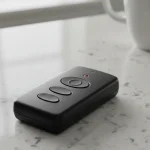
Garage Door Opener Stopped Working?
A little glitch might be enough to throw off the tiny computers inside garage door openers. These hidden parts remember things like remote clicks and code entries, but they’re trickier to handle than anyone tends to expect.
Power outages, electrical surges, dead remote batteries, or even nearby electronics can interrupt communication between the opener and its controls.
From real-world experience, many “broken” garage door openers aren’t broken at all. They just need a reset to clear out old signals and start fresh.
When Resetting Your Garage Door Opener Might Help
When the remote quits out of nowhere, yet the wall switch functions as expected, it might be time to reset the opener. The keypad ignoring inputs is another sign something needs adjusting. Power interruptions can leave the system acting unpredictable. Inconsistent responses afterward often point to a reset being useful. That odd behaviour could simply need a fresh start to sort itself out.
When the motor runs yet the door stays still, or lifting it by hand takes significant effort, resetting won’t fix things. Chances are something inside has gone wrong (springs or cables most likely) and touching those on your own could go badly.
A Few Safety Notes Before You Start
Start by checking that the garage door sits completely shut. Clear out everything nearby so there’s open space. Have children and pets stay out of the way while you work. If the opener hangs above, reach it only with a strong, steady ladder.
Never reach for the springs, wires, or rails when resetting. A tilt in the door, sudden close, or sharp noises usually means trouble – step back and get help. These problems go beyond what a reset can solve.
Step One: Try a Simple Power Reset First
The easiest thing to try is a basic power reset.
Unplug the garage door opener from the outlet and wait about 30 seconds. Plug it back in and test the wall button and remote. This step alone often fixes minor glitches caused by brief power interruptions.
If everything works normally again, you’re done. If not, move on to a full reset.
Step Two: Find the Learn or Program Button
A small button labelled ‘Learn’ or ‘Program’ sits on every new garage door opener’s main unit. Look closely – it hides under the casing sometimes, or by a thin wire sticking out. Bright colours highlight it: maybe red, green, could be yellow or even purple. Finding it takes just a glance once you know where to check.
This button controls the opener’s memory, so you’ll be using it for the next steps.
Step Three: Clear the Opener’s Memory
Start by holding down the Learn button – keep pressing for somewhere between six and ten seconds. When the light shuts off, let go of the button. Every remote code saved inside gets wiped clean at that moment.
Picture restarting your phone. Old links and unnecessary data get cleared out. The machine resets fresh.
Step Four: Update the Device Settings
Once the reset finishes, the remote will stay offline until it pairs again.
One time only, push down then let go of the Learn button. Now watch – light comes on or it flickers. You will have 30 seconds before trying the next step. Press the remote’s button while timing still counts. A blink should show up, and a clicking sound should follow.
Start fresh with a new battery if pairing fails at first. Then give it another go. Weak batteries cause more reset problems than most people expect.
Step Five: Reprogram the Keypad
If you use a keypad, this must also get reprogrammed when used.
Start by tapping Learn. Put in a fresh PIN using the keys. Hit Program after that. See how it works with the lock mechanism. See if the door moves without error.
A fresh start often works better than digging up past codes, particularly after moving in. We suggest resetting the old PIN code entirely when settling into a new place for security.
How To Reset Garage Door Opener – Brand-Specific Tips
LiftMaster along with Chamberlain models operate in a nearly identical fashion. Newer models require every remote and keypad to be reprogrammed after a reset. Skipping one can cause strange, on-and-off problems later.
Genie openers are a bit pickier about timing. Pressing buttons too early or too late can make it seem like the reset failed when it didn’t.
Craftsman openers, especially older ones, may reset successfully but lose programming again shortly after. If this happens, the issue is often an aging circuit board rather than user error.
What If the Door Opens or Closes Incorrectly After a Reset?
Sometimes the opener works but the door stops too soon or reverses before closing. That usually means the travel limits need adjustment.
This happens most often after a power outage or when the door has been operated manually. Resetting the travel limits teaches the opener where the door should stop. The process varies by brand, but the opener’s manual will walk you through it step by step.
When Resetting Will Not Fix the Problem
A reset only fixes communication issues between the opener remote and the motor. Fixing worn gears is beyond a reset. Broken springs also can’t be fixed by it. Frayed cables remain untouched. Misaligned tracks stay that way.
When you notice the door dragging, sitting crooked, yet slamming shut too hard – shut it down there and then. Springs in garage doors hold massive pressure, turning them into hazardous parts if touched by someone untrained.
How Often Should You Have to Reset Your Garage Door Opener?
Most times, resetting the opener isn’t necessary. When it happens regularly, an underlying problem often hides undetected. Power glitches, signal noise, or parts worn down by time tend to be behind it.
When you keep resetting but the issue comes back, it could be worth checking what’s underneath.
Simple Steps to Prevent Future Issues
- Batteries in remotes should be swapped every twelve months – whether they’re still functioning or not. A fresh set yearly keeps issues quiet.
- LED Bulbs made for garage openers help cut down on signal interference.
- Once every few weeks, check if the safety sensors work right. Start by making sure they respond when blocked.
- Schedule regular maintenance.
- Only pull the plug on the opener when you really need to.
Final Thoughts
Fixing a garage door opener normally starts with a simple reset – fast, yet powerful if handled right. Sometimes that quick move cuts down delays, sometimes it just adds confusion. Knowing when a reset makes sense, and when it doesn’t, helps you to avoid frustration and stay safe.
If resetting the opener fails, chances are the trouble lies deeper than the remote or basic setup. Only then does calling in a professional make sense – If you’re unsure whether you need a pro for the job or not, please see our guide here. Safety matters, plus mistakes could worsen things. If you’re living near the South East of England and stuck searching how to reset garage door opener, Reach out to Bullet Garage Doors today. A visit could be just what’s needed; we’ll check it closely, fix whatever’s wrong, and leave your garage door fully functional. Call us today on 07880 542433 or 01582 932025.